Installation & Scheduling
Please review this information before subscribing and scheduling installation.
1. How the process works
The first step is to sign up using our online subscription form. That puts you in our database and in line for a connection. You will not be billed until your service is fully installed.
When we receive your subscription, we survey your property to see whether you qualify for a standard outside connection or need something more. Please read Exterior Connection so you know what to expect. Once the cable has been run from the nearest pole to the box on your building, we’ll call you to schedule the full installation. You must be home for the full installation.
2. Installation
Installation costs $99 for residences and $150 for businesses. Large or complex installations are charged an additional $75 per hour for work beyond two hours.
We connect any building within 400 feet of the nearest drop connection point on a utility pole with an aerial fiber-optic cable at no additional charge. Buildings farther away, or that need underground cable, may have additional fees, which can be paid over several months. See Exterior Connection for details.
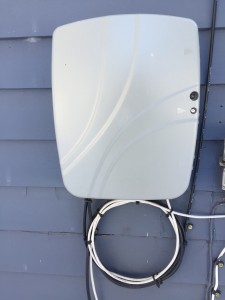
Installation includes mounting a small box called an NID (Network Interface Device) on the outside of your building, usually next to your current utility box. Our technicians run a high-capacity data cable from the NID to one location of your choice inside.
Wi-Fi router: A router lets you connect multiple wired and wireless devices. In some areas you need to have or buy your own wireless router, and our technicians will connect it during installation. In other areas the router is built into the LymeFiber equipment. Ask the person who calls to schedule your installation whether you need your own.
Battery backup: Installers connect a battery backup for your phone service so you can still make calls during a power outage. LymeFiber can supply larger batteries at extra cost, or you can add your own emergency power. The LymeFiber battery does not power your router or telephone set. To keep them working during an outage, buy an uninterruptible power supply (UPS) from any electronics store. See also Power Outages and Phone Service.
3. Internet service
LymeFiber offers a choice of internet speeds. Unlike cable or DSL, our service is symmetrical: you send files and video as fast as you receive them. There are no contracts. You can upgrade or downgrade at any time by emailing support@notices.lymefiber.net.
4. Phone service
Phone service includes unlimited local and long-distance calling and several calling features. Voicemail is included at no extra cost, with the option to receive messages as email attachments. There is a one-time activation fee of $30 per line, and transferring your service takes about 10 business days. Telephone user guides are emailed once your lines have been transferred.
5. Keeping your phone number
Please do not cancel your current phone service. We’ll handle disconnecting your old line while we transfer your number. You’ll need to complete a Letter of Agency. Your account with your old provider must be current and in good standing, and the transfer takes 10 days or more.
If you need to change the date or time of a scheduled phone transfer visit, tell us at least 48 hours ahead. Without that notice, your number may not switch over properly: you could lose the ability to receive calls on the scheduled day and to place calls the following day.
Two weeks after your LymeFiber phone service is installed, call your former phone provider to make sure they’ve stopped billing you.